
Tool 1 — See their screen: FaceTime screen sharing
On a FaceTime call, your parent can share their screen with you: during the call, tap the screen-share button, then Share My Screen. You'll see what they see, live, while you talk. That turns "a box appeared" into "oh — that's the software update prompt, tap Later." The hard part is that the sharing starts on their phone, so the first time, practice it together in person and write the steps on a card. Both phones need a reasonably current iOS (screen sharing arrived with iOS 15.1).
Tool 2 — Tap it for them: remote control
Newer iPhones go a step further: during a FaceTime screen share, you can request remote control of their screen (Apple added this with iOS 18 — both phones need it). They approve the request, you tap and swipe for them, and they can end it at any time. When it's available, it's the closest thing to being in the room. Two honest cautions: it needs them to answer the FaceTime and approve the request — so it still depends on the skill you're trying to support — and on older iPhones it isn't available at all.
Tool 3 — Prevent the calls: give them a screen that doesn't break
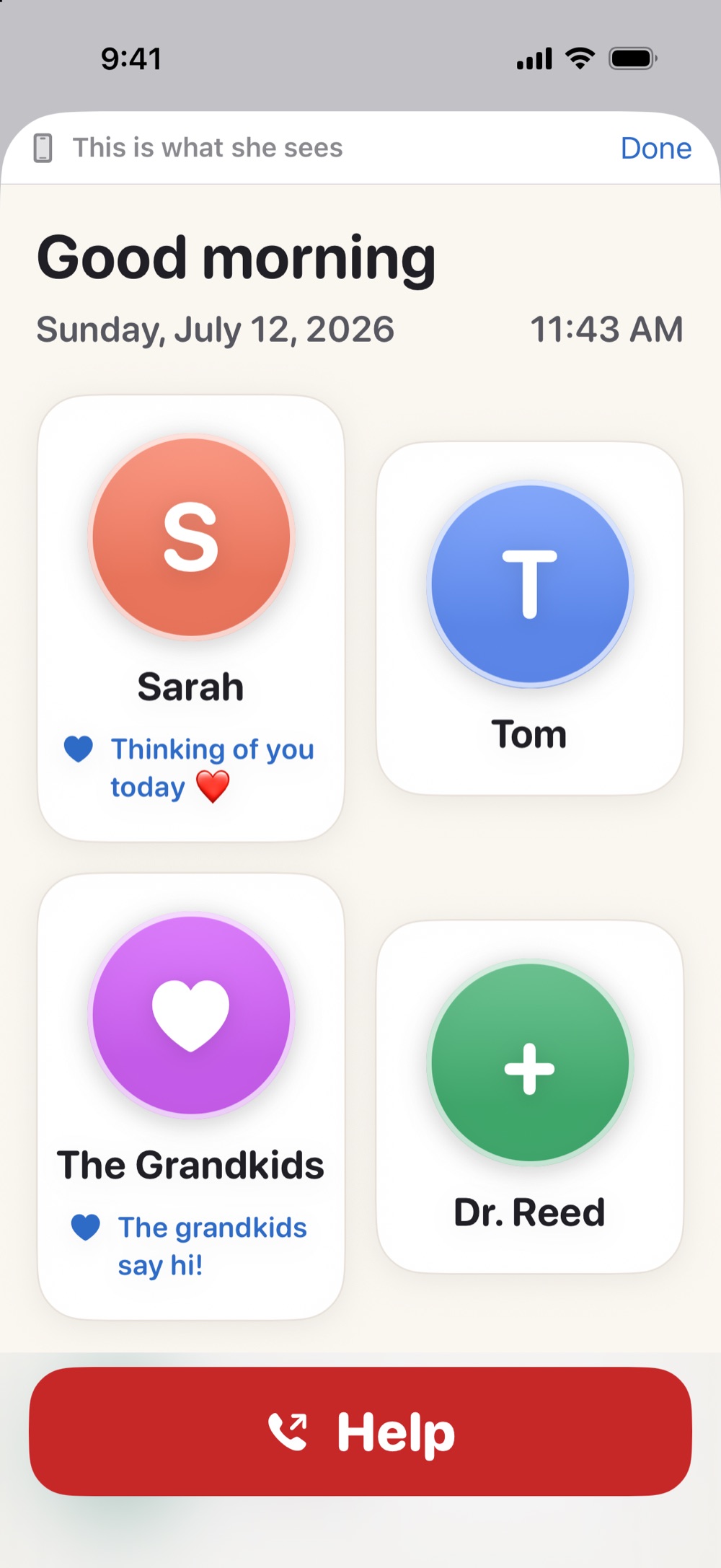
Screen sharing is for emergencies. The bigger win is making the emergencies rare. Most "Mom's phone is broken" calls are really: something moved, something popped up, or the thing she needed was buried. Simple Phone Helper attacks that directly — her home base becomes one calm screen with the family as big faces, a Help button, and tools for seeing and hearing, and it can't be rearranged from her side, because there's nothing on her side to configure. You manage all of it from Phone Helper Family on your own phone: change a number in the grocery line, add the new grandbaby's photo from another state, and her screen quietly updates. There's even a live preview, so you see exactly what she sees — which, you may notice, is the whole dream of remote support.
Make a "when things break" plan (15 minutes, once)
(1) Practice one screen-share together in person. (2) Put a card by their charger: "If the phone is confusing, call Sarah and we'll look at it together." (3) Turn on automatic iOS updates on Wi-Fi so you're not troubleshooting three-version-old software. (4) If their needs are bigger than a calm home base — if the whole phone needs simplifying — read our honest guide to Assistive Access, iPhone's built-in "senior mode."
Give them a calm place on the phone they already own
Simple Phone Helper is coming soon to the App Store. Join the launch list and we'll email you the day it's ready.
Join the launch listFAQ
Can I remotely control my elderly parent's iPhone?
Yes, with limits: during a FaceTime screen share on iOS 18 or later (both phones), you can request remote control, and your parent approves it. There's no way to silently manage their iPhone without their participation — by Apple's design.
How do I see my parent's iPhone screen from far away?
FaceTime screen sharing. On the call, they tap the screen-share button, then Share My Screen. You'll see their screen live while you talk them through it. Practice it together once in person — the starting step is on their side.
How do I stop being tech support for my parents?
Reduce what can go wrong: a calm, decluttered home screen, automatic updates, notifications trimmed to the essentials — and a home base you configure remotely, like Simple Phone Helper, so fixes happen from your phone instead of through descriptions over speakerphone.