
A calm, simple home screen for your parent's iPhone.
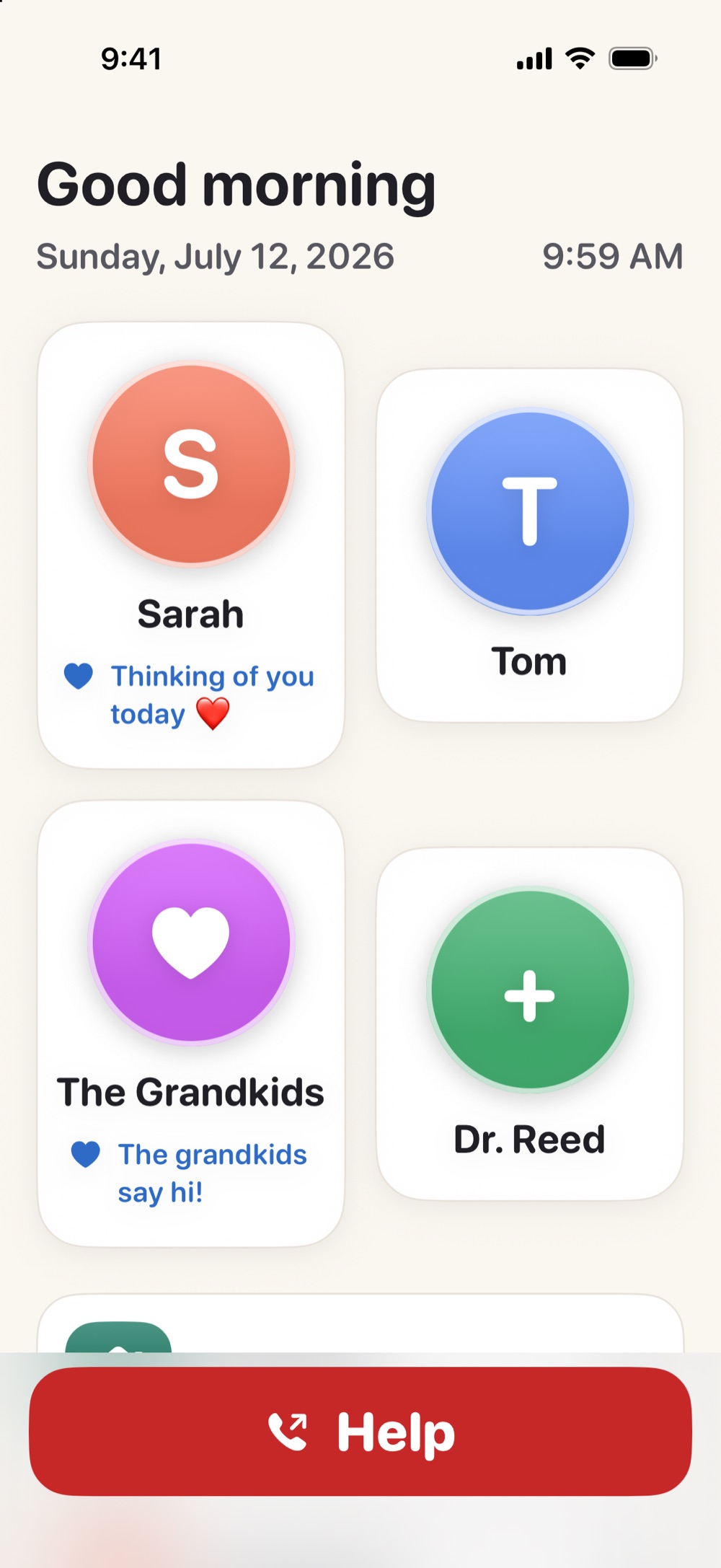
Simple Phone Helper turns the iPhone your mom or dad already owns into a warm, steady place: the people they love as big faces, one tap to call or FaceTime, and gentle tools that help them see, hear, and read. You set it all up from your own phone — from anywhere.
Coming soon to the App Store · Free to download · Optional Family Plan
No ads. No tracking. Nothing for them to configure — that's your job, and it takes minutes.
- One tap to call or FaceTime
- Set up from your phone
- Big faces, big text
- Magnifier, read-aloud & captions
- No ads, no tracking
- Essentials never paywalled
Their iPhone, made calm.
The iPhone is wonderful. It's also a lot.
Somewhere between the app grid, the notifications, and the settings that move, the phone stopped feeling like theirs. Maybe your dad accidentally rearranged his home screen and can't find the Phone app. Maybe your mom stopped video-calling because one wrong tap sends her somewhere confusing. And you can't fix it from where you live.
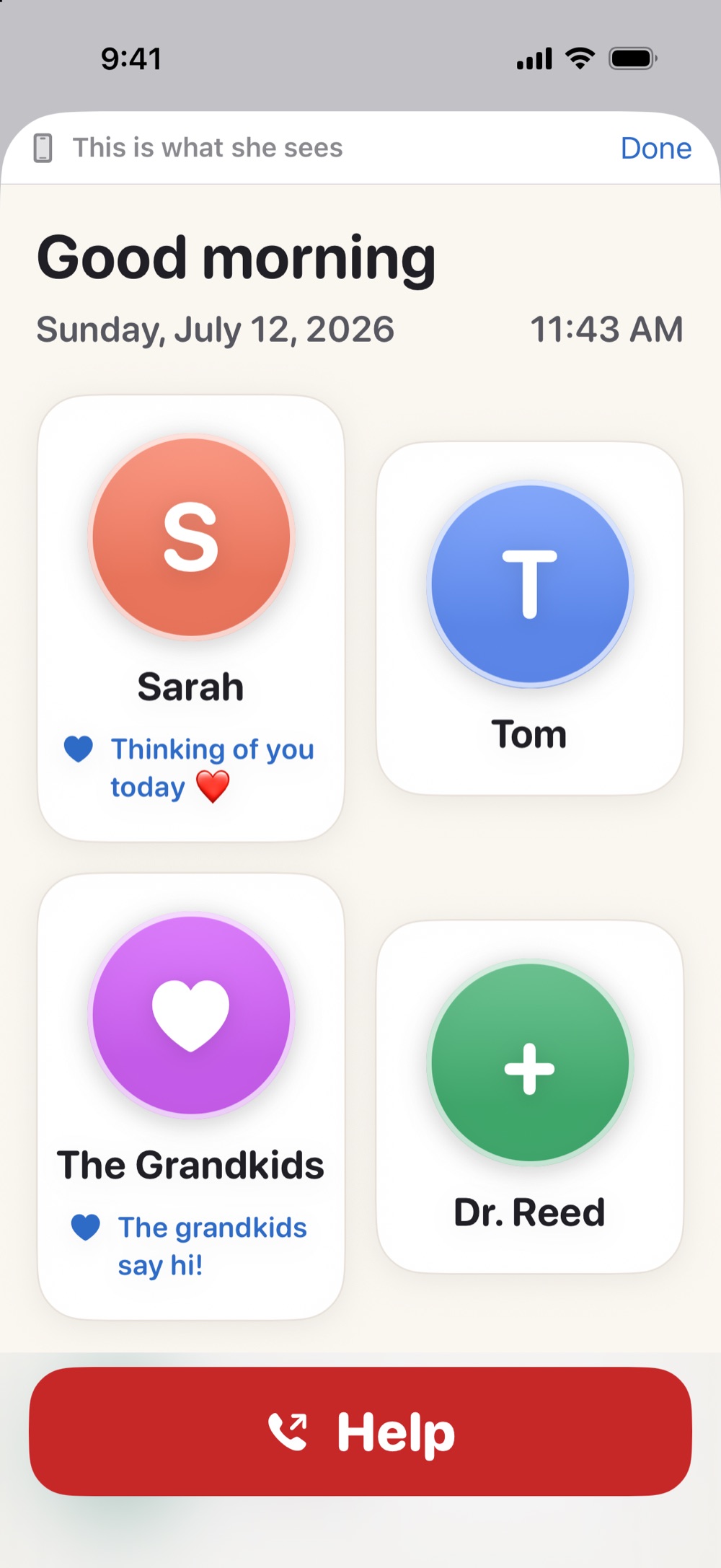
Simple Phone Helper gives them one place that never changes: open it, and there's a friendly greeting with the day and time, the family as big faces, and help that speaks out loud. Everything else about their iPhone stays exactly as it was.
You set it up. They just tap.
It's two apps that work as one — yours and theirs.
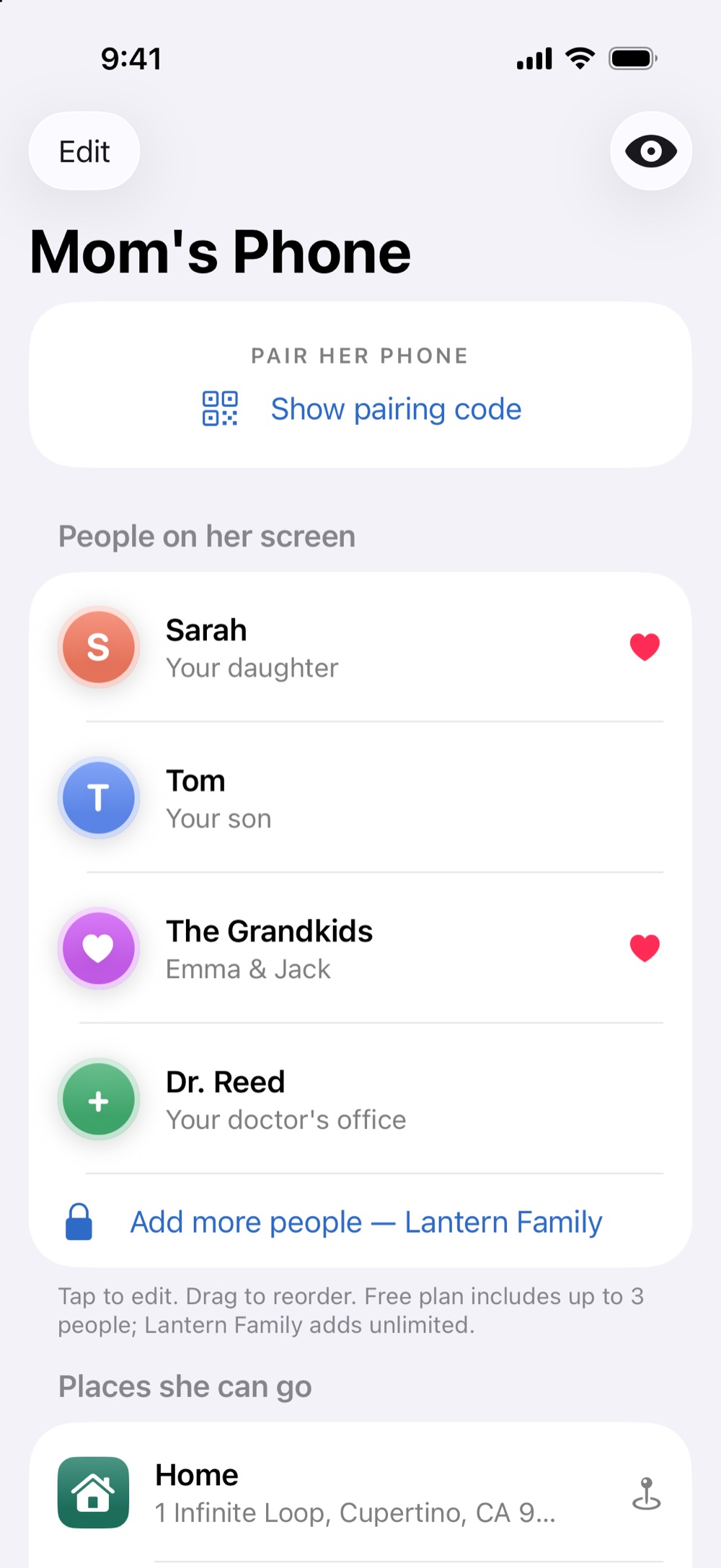
- Get Phone Helper Family on your phone.Add the people who matter — names, photos, phone numbers, even a little note like "Thinking of you today ❤️".
- Put Simple Phone Helper on theirs.Install it on their iPhone during a visit, or talk them through it once — it's the only step that touches their phone.
- Pair the two with a one-time code.Your app shows a short code (and a QR code). Enter it on their phone once, and the two are connected.
- Update it from anywhere, anytime.Add a grandchild's photo from 400 miles away. Their screen quietly updates on its own — nothing for them to accept, tap, or learn.
Before anything lands on their phone, Phone Helper Family shows you a live preview — this is exactly what she'll see.
Made for their hands, their eyes, and your peace of mind.
The people they love, one tap away
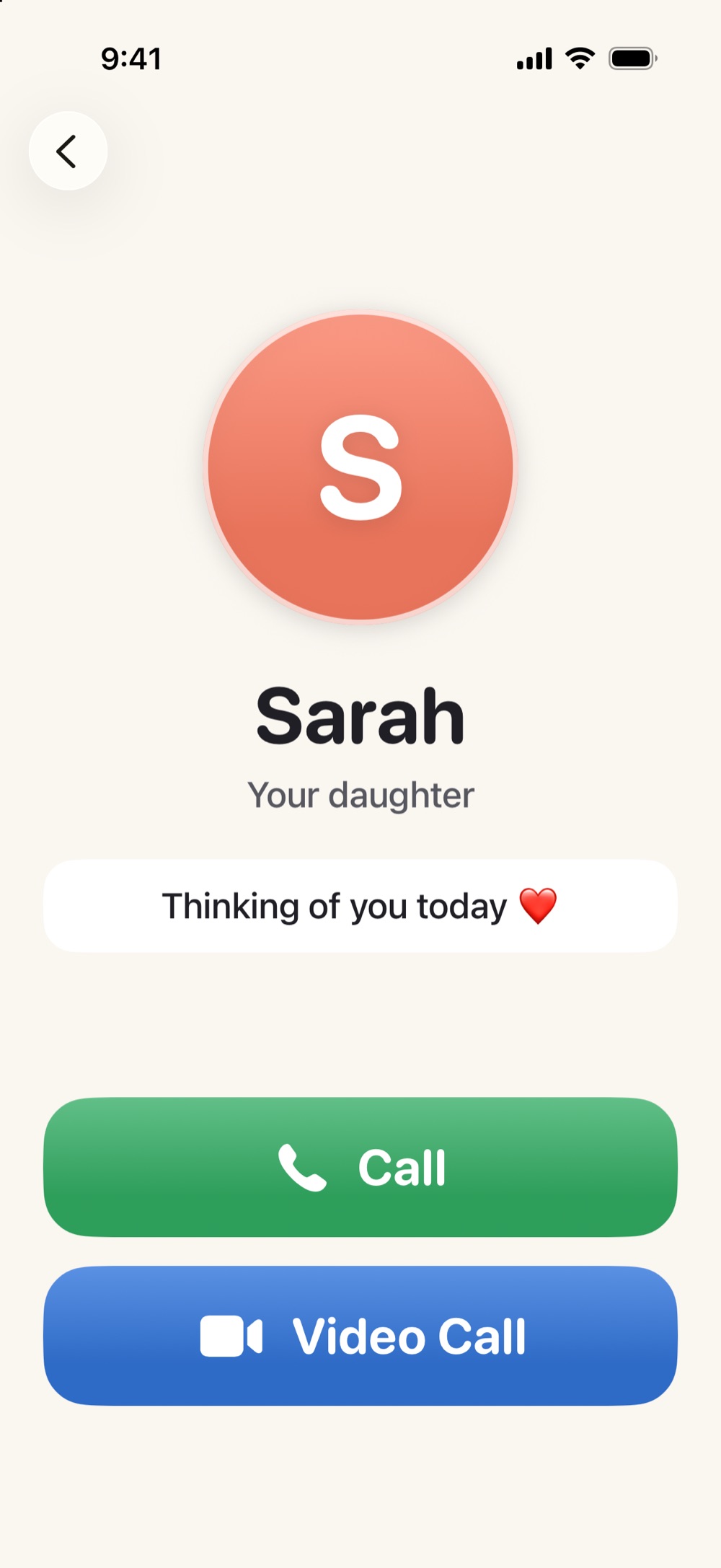
Big faces instead of tiny icons. Tap Grandma's daughter and the phone offers two huge buttons: Call and Video. Video calls are real FaceTime — the family stays on the apps they already use.
A screen that never rearranges itself
Same faces, same places, every single time. The greeting at the top gently anchors the day: "Good morning — it's Tuesday, June 9."
You're the helper, without the house calls
Change a phone number, add a photo, reorder the faces — from your own phone, wherever you are. No more reading menus to each other over speakerphone.
Help is always in reach
A clear Help button calls the family member you choose. You can also add one-tap directions — a big "Go Home" button opens Apple Maps the moment they need it.
Gentle tools for seeing, hearing, and reading
Tucked under the faces are three tools that meet real moments — and they're free for every family, always.
See Better
A camera magnifier with zoom and a flashlight. Point it at anything and ask "What is this?" — it looks and answers out loud, right on the phone.
Read to Me
Mail in small print, a label, the tiny type on a leaflet — center it in the frame and the phone reads the words aloud, right on the phone.
Live Captions
When hearing is the hard part, Live Captions turns nearby speech into big, readable text on screen. (For phone and FaceTime calls, iPhone's built-in system captions carry the conversation.)
Read to Me always works on the phone itself — the words it reads are never sent anywhere. See Better works on the phone too, unless a family member turns on the optional "Smarter descriptions & natural voice" upgrade, which sends the photo securely to an AI service for a richer answer in a natural voice. It's covered plainly in our Privacy Policy.
See it for yourself
Free where it matters. Fair where it grows.
Both apps are free to download. The free setup covers the heart of it: the calm home screen, calling and FaceTime, all three assistive tools, and up to three people on their screen.
The optional Family Plan — $12.99 a month after a 7-day free trial, shared with your whole family through Apple's Family Sharing — adds unlimited people, saved places like the "Go Home" button, family notes and moments, an Apple Watch companion, and Smarter descriptions.
- Calling and the assistive tools are never behind the paywall.
- If you cancel, nothing already on their phone is taken away.
- Your parent never sees a price, a paywall, or a pop-up. Ever.
Pricing shown as configured for launch and may change; the App Store listing is always the source of truth.
Built for families like yours
For the daughter who is one missed call away from driving over. For the son who has explained FaceTime eleven times with love and once through gritted teeth. For grandparents who want the grandkids one tap away — and for older adults who don't want a "senior phone," just their own phone, made kinder. If someone you love has an iPhone and a family that wants to stay close, it's for you.
Honest guides for helping a parent with their iPhone
Written for real families — useful whether or not you ever install the app.
Make an iPhone easier for a senior
Nine settings that genuinely help, in order.
Read the guide →Set up an iPhone for an elderly parent
The checklist for doing it right the first time.
Read the guide →iPhone's "senior mode," explained
What Assistive Access does — and when you'll want more.
Read the guide →Helping a parent with their phone from far away
Screen sharing, remote control, and calmer options.
Read the guide →Senior phone — or the iPhone they already own?
An honest look at both paths.
Read the guide →Questions families actually ask
How does the setup actually work?
You install Phone Helper Family on your own iPhone and add the people, photos, and settings. Then Simple Phone Helper goes on your parent's iPhone — during a visit, or talked through once. Your app shows a one-time pairing code; enter it on their phone and you're connected. From then on, every change you make syncs to their screen on its own.
Does my mom or dad have to set anything up?
No. The setup, the people, the photos, the Help button — all of it is done from your phone. Their side has no settings screen at all. They open one app and tap the person they want.
Which iPhones does it work on?
Both apps need iOS 18 or later — that's iPhone XS and newer. It also runs on iPad, and the Family Plan includes an Apple Watch companion (watchOS 10 or later) that shows the same faces on their wrist.
Is it free? What does the Family Plan add?
Both apps are free to download. Free includes the calm home screen, calling and FaceTime, all three assistive tools, photos, and up to three people. The optional Family Plan ($12.99/month after a 7-day free trial, shareable through Apple Family Sharing) adds unlimited people, saved places like "Go Home," family notes and moments, the Apple Watch companion, and Smarter descriptions.
What happens if I cancel the Family Plan?
Nothing on your parent's phone disappears. Whatever you've already set up stays. Canceling only stops you from adding more premium things — and calling, FaceTime, and the assistive tools were never behind the paywall to begin with.
Is this a medical-alert or emergency device?
No. The Help button calls one family member you choose — that’s the whole of what it does. It does not call 911, and there’s no monitoring center behind it. For emergencies, the iPhone already has Emergency SOS built in: it works from the buttons, even on the lock screen, without opening any app — it’s worth setting up along with a Medical ID. If your parent needs monitored emergency response, this app doesn’t replace it.
Does it take over or lock down the iPhone?
No. It's a regular app — usually the one place they live in — and the rest of the iPhone stays untouched. iOS doesn't let any app replace the home screen. If you want deeper simplification, Apple's built-in Assistive Access can lock the whole phone down; our senior-mode guide explains both paths honestly.
What about our family's privacy?
No ads, no tracking, no selling data — and no account emails or passwords; pairing uses anonymous accounts. Only the names, numbers, photos, and notes you choose to add are stored, and "Delete This Family & All Data" in the family app erases everything from our servers. The full Privacy Policy is one click away.
Can she still use FaceTime with everyone?
Yes — the Video button places a real FaceTime call through the phone's own FaceTime. Family on iPhones and iPads sees her exactly the way they always have. (iOS asks for one confirming tap when a call starts — the app tells her out loud exactly what to tap.)
Is there an Android version?
Not today. Both apps are iPhone-only. If your parent uses Android, this isn't the right fit — some of the guides below may still help.
Be first in line when it launches
Simple Phone Helper is in family testing now and coming soon to the App Store. Join the launch list and we'll email you the day it's ready — nothing else.
Join the launch listComing soon to the App Store · Free to download · Optional Family Plan